


 Posts





Tuesday, January 19, 2010
Google's Street View Updated
Since my last post Google has corrected the address for Colton's Steakhouse restaurant in Mountain Home, AR and has sent their street view vehicle back around so that now you can see the restaurant with street view. Good job Google!

Monday, December 29, 2008
Google Maps and Street View verses ProximityCast

The ProximityCast Advantage
Google's street view is an amazing and useful program, however ProximityCast has advantages over street view that will be exposed in this post.
Google's street view has recently gotten to Mountain Home, Arkansas. Colton's Steakhouse Restaurant has also recently opened in Mountain Home, Arkansas.
At the time of the creation of this post, if you type into Google Maps search maps: "Colton's Steakhouse Mountain Home, AR" you will be taken to an obviously wrong address. Using Street View will reveal no Colton's Steakhouse. Google Maps took me to these coordinates: 36.29030141495939, -92.32628524303436 and said it was this address: 2390 Highway 62 E, Mountain Home, AR
Pasting the street address into Google Maps took me to the same wrong coordinate location. A check of Colton's website shows the Mountain Home address as: 22370 Highway 62 E
Pasting in the correct street address (2370 instead of 2390) still produced the same wrong location.
ProximityCast.com requires the Latitude and Longitude coordinates of where the picture was taken to be placed on all establishment pictures submitted. The Mountain Home, Arkansas Colton's Steakhouse coordinates are: N 36°21.45'W 92°20.75' If these coordinates are pasted into Google Maps search maps box you will be taken to the correct location for Colton's Steakhouse Restaurant in Mountain Home, Arkansas.
Wrong coordinates can be placed on a photo or erroneously entered into the database, but ProximityCast.com allows users to flag inaccurate coordinates and photo submitters will be given an accuracy rating that alerts you to locations with inaccurate coordinates. Google Maps also has a means to correct inaccurate locations, so the bogus location for Colton's may be corrected by the time you are reading this. It is not hard to find wrong locations in Google Maps.
The placement of a location's coordinates on ProximityCast Establishment Images may seem unnecessary and a lot of trouble, BUT it is a photographer's means of certifying that the location is correct at the time the photo was taken. (Businesses do go out of business or move).
Now back to Street View comparisons... If you paste the coordinates from the ProximityCast Colton's Steakhouse image, N 36°21.45'W 92°20.75' into Google Maps search maps box you will arrive at the correct location. BUT, when you explore street view you will only find an empty lot with a Colton's construction sign indicating the restaurant will be built on this site.
Street view is a remarkable means of adding and showing a lot of visual data quickly. Its weakness three fold: 1) as in Colton's Steakhouse for the Mountain Home, AR location the restaurant actually exists now but did not exist at the time the street view camera rolled through the area. By contrast anyone can contribute a current picture of any place to ProximityCast.com at any time. You the user have control. For street view we have to wait for the Google car to cruise an area again. 2). Businesses go out of business or move. When will street view indicate that condition? ProximityCast once again provides the user with the control necessary to flag either condition. 3). The quality of the street view picture is sometimes found wanting. ProximityCast.com provides a photographer with the means to control the quality of an image. ProximityCast also allows multiple images of the same location showing different perspectives or night and day shots.
Okay, so I did a lot of trashing of Google Maps and Street View with this post. Actually I love their technology and think they are both a great product. I could point out some weaknesses with ProximityCast also. When the two are combined the total capabilities are simply amazing. You can get to Google Maps and Street View (when it exists) quite easily from ProximityCast.com. Google Maps difinitely complements and enhances ProximityCast.com. Likewise ProximityCast.com complements and enhances Google Maps and Street View giving all end users control over location data.
Now all we need is a little bit of traction and users to start utilizing and submitting ProximityCast Establishment photos so all of us will have a better location technology experience.
Wednesday, November 19, 2008
Sunday, August 17, 2008
Getting Coordinates of of Google Maps revisited
- Open Google Maps
- Right Click on the spot where you want to know the Latitude and Longitude coordinates.
- Select
"Directions to here" or "Directions from here"
"What's here?" on the pop-up menu - The coordinates appear in the "Get Directions" box top left side of the map.
The coordinates are in "decimal degree" format. You can copy and past them into the Google Search Maps text box and click "Search Maps" to have a marker appear on that spot and also see the coordinates displayed in Degrees, Minutes, Seconds.
understanding of coordinate formats
The decimal degree format can be pasted directly into the ProximityCast Antipode Tool to see what is on the opposite side of the world.
Thursday, August 14, 2008
One Picture with Multiple Establishments
ProximityCast.com continues to improve!
Strip Mall with Six Establishments

One Picture with Multiple Establishments is now complete!
You can use Morrilton, AR as a cast initiation point to check out this strip mall with “6” establishments.
Now pictures with up to “9” establishments can be loaded with each individual Establishment uniquely identified.
Dual Establishments Under One Roof

It is common to find dual establishments coexisting like this Taco Bell and KFC all under one roof but clearly two separate establishments.
Now the multiple establishment routine makes it easy.
Baskin Robbins inside an Exxon Station

This Baskin Robbins inside an Exxon is not as clearly divided as the Taco Bell and KFC, but still lends itself to One Picture with Multiple Establishments to help users find just what they need. As always, if you have any questions or suggestions use the contact form to pass them along.
Till next time my friends, thanks for all your photo submissions!
ciao
Monday, July 14, 2008
Google Street View
Wow! Google does so many things well. Street View is such an awesome application that it is almost enough to cause me to see ProximityCast as unnecessary, however I think the two applications are quite complementary in many ways.
In this blog entry I'll show how easy it is to go to street view from ProximityCast when desired or necessary.
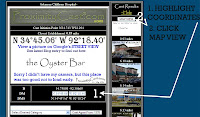
On the CastNet page shown in the image:
1. Copy the establishments coordinates for pasting into Google Maps.
2. Click on MAP VIEW for easy access to Google Maps.
3. Click on the Google Map logo found on the lower left of the Map View to go to Google's full map services.
4. Paste the coordinates copied from step one into Google's Search the map box and select Street View for a better look around!
For the user's convenience ProximityCast displays the database coordinates in all three commonly used formats:
Decimal Degrees: D 34.75098 -92.30665
Degrees Minutes: DM N 34°45.06' W 92°18.40'
Degrees Minutes Seconds: DMS N 34°45'3.6" W 92°18'24"
Any of the three formats should work great in Google Maps. Copy the one of your choice. The coordinates shown will take you to a street view covered area and let you see the Oyster Bar restaurant which had a great oyster Po Boy on the day we ate there. Use your left or right arrow keys to rotate the view around until you see the Oyster Bar.
In this blog entry I'll show how easy it is to go to street view from ProximityCast when desired or necessary.

On the CastNet page shown in the image:
1. Copy the establishments coordinates for pasting into Google Maps.
2. Click on MAP VIEW for easy access to Google Maps.
3. Click on the Google Map logo found on the lower left of the Map View to go to Google's full map services.
4. Paste the coordinates copied from step one into Google's Search the map box and select Street View for a better look around!
For the user's convenience ProximityCast displays the database coordinates in all three commonly used formats:
Decimal Degrees: D 34.75098 -92.30665
Degrees Minutes: DM N 34°45.06' W 92°18.40'
Degrees Minutes Seconds: DMS N 34°45'3.6" W 92°18'24"
Any of the three formats should work great in Google Maps. Copy the one of your choice. The coordinates shown will take you to a street view covered area and let you see the Oyster Bar restaurant which had a great oyster Po Boy on the day we ate there. Use your left or right arrow keys to rotate the view around until you see the Oyster Bar.
Friday, April 25, 2008
Contact Page added
Thanks to a nudge from a good friend I got busy and added a Contact page to ProximityCast.com
Feed back is useful, motivating, and appreciated.
As a solo act things don't always go as fast as I might like, but I take all constructive criticism seriously and try to get to things as fast as I can. There is still a lot to do to make ProximityCast all it can be. I still need a means to encourage users to submit their "Location Pictures". If everyone contributes just a little the site will become a whole lot more useful for all of us.
I'd be happy simply taking and contributing pictures, but there is so much to do and I can't capture the world by myself.
It is fun though doing what I can as I can.
Till next time my friends,
ciao
Feed back is useful, motivating, and appreciated.
As a solo act things don't always go as fast as I might like, but I take all constructive criticism seriously and try to get to things as fast as I can. There is still a lot to do to make ProximityCast all it can be. I still need a means to encourage users to submit their "Location Pictures". If everyone contributes just a little the site will become a whole lot more useful for all of us.
I'd be happy simply taking and contributing pictures, but there is so much to do and I can't capture the world by myself.
It is fun though doing what I can as I can.
Till next time my friends,
ciao
Subscribe to:
Posts (Atom)